

10. BASICS | Functions in JavaScript
This article will talk about javascript functions.
How to create functions in javascript?
There are three ways to create functions in javascript.
1. Function Declaration
A function without a return keyword always returns
undefined.
// A function without parameters
function myFunc() {
    // code
};


// A function with parameters
function myFunc(parameter1, parameter2) {
    // code
};


// A function with default parameter (parameter2)
function myFunc(parameter1, parameter2 = 'shubham') {
    // code
};
A function can also return a value. The value is returned back to the caller.
function myFunc(parameter1, parameter2 = 'shubham') {
    // code
    return 'success'
};

const result = myFunc(25);

console.log(result); // 'success'
typeof(myFunc) will return 'function' but, behind the scene, a function is always an object. To verify, do console.dir(addTwoNumbers).Hence, a function is an object, we can assign a function to a variable. This gives birth to function expressions.
2. Function Expression
let sayHi = function() {
    // code
};
sayHi();

const greetUser = function(username) {
    // code
};
greetUser('shubham');

let addTwoNumbers = function(num1, num2) {
    // code
    return num1 + num2
};
result = addTwoNumbers(4, 5);
3. Arrow Function
Introduced in ES6.
const functionName = (parameters) => {
  // function body
  return result;
};
- Implicit Return (single expression body):
If the function body is a single expression, you can omit the curly braces {} and the return keyword for an implicit return.
const sum = (a, b) => (a + b); // Implicitly returns a + b
- Explicit return (multiline body):
If the function body is multiline, curly braces {} and the return keyword required.
const sum = (a, b) => {
  const result = a + b;
  return result; // Must explicitly return a value
};
Difference between parameter and argument
// num1 and num2 are parameters
function addTwoNumbers(num1, num2) {
    return num1 + num2
}

const result = addTwoNumbers(3, 4) // 3 and 4 are arguments
A parameter can take argument of any data type (string, number, boolean, array, object, etc.).
arguments keyword
A built-in array-like object accessible inside all non-arrow functions, which contains the values of all arguments passed to that function.
Key Characteristics
- Array-like, Not an Array: The
argumentsobject has indexed properties (e.g.,arguments[0]) and alengthproperty, but it lacks built-inArraymethods likeforEach(),map(), orpop().
Array.from(arguments) will create an array.- Availability: It is a local variable created automatically when a regular function is called. It is not available within arrow functions, async functions, or generator functions. In an arrow function, accessing
argumentswill look for it in the outer (enclosing) scope.
Purpose
It is historically useful for creating variadic functions (functions that accept an indefinite number of arguments), allowing developers to iterate over all passed values, even if no formal parameters were declared.
function func() {
  console.log(arguments);
}
func(1, 2, 3, true, 'shubham');
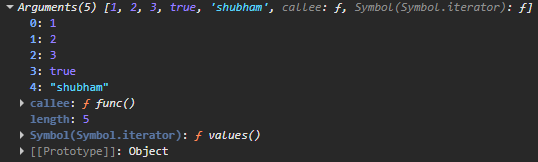
...args) is the preferred way to handle a variable number of arguments.Default parameters
Introduced in ES6.
function functionName(param1 = defaultValue1, param2 = defaultValue2) {
  // function body
};
If a function is called without an argument for that parameter, or with undefined as the argument, the default value is used.
function func(a = 1) {
  console.log(a);
};

func(); // Output: 1
func(undefined); // Output: 1

func(3); // Output: 3
func(null); // Output: null
func(""); // Output: ""
func(true); // Output: true
Happy reading!